
Significant Figures Calculator: Count, Round & Calculate
Type any number to see how many significant figures it has, which digits count, and what it looks like rounded to the number of sig figs you choose. The second tab adds, subtracts, multiplies or divides two measurements and rounds the answer with the significant-figure rules. Either number can be marked as exact.
For example, 0.004500 has 4 significant figures. The three zeros in front only place the decimal point. The 4, the 5 and the two zeros at the end all count, because zeros written after a decimal point show the number was measured that precisely.
Decimals, whole numbers and scientific notation all work: 0.004500, 1200, 1200., 6.022e23, 3.00 × 10^8
Counting, Rounding and Calculating With the Tool
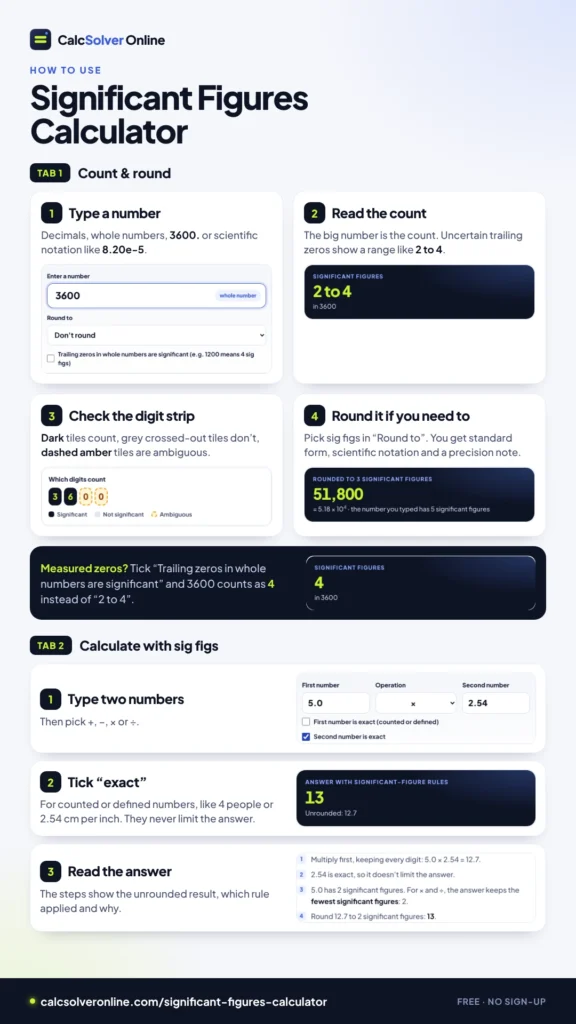
Count & round tab
- Type a number. Decimals (0.0350), whole numbers (3600), numbers with a decimal point at the end (3600.) and scientific notation all work. Write scientific notation as 8.20e-5, 8.20E-5 or 8.20 × 10^-5.
- Read the count. The big number is the count of significant figures. If the number has trailing zeros that may or may not count, you see a range such as “2 to 4”.
- Check the digit strip. Each digit is marked: dark tiles count, grey crossed-out tiles don’t, and dashed amber tiles are ambiguous.
- Round it, if you need to. Pick a number of significant figures in “Round to”. The answer appears in standard form and scientific notation, with a note if the standard form hides the precision.
If you know the trailing zeros in a whole number were measured, tick “Trailing zeros in whole numbers are significant”. 3600 then counts as 4 significant figures instead of “2 to 4”.
Calculate with sig figs tab
- Type the two numbers and pick +, −, × or ÷.
- Tick “exact” for any number that was counted or is defined, such as 4 people or 2.54 cm per inch. An exact number never limits the answer.
- Read the answer. The steps show the unrounded result, which rule applied and why.
The Rules for Counting Significant Figures
A significant figure is a digit that carries real information about the size of a measurement. Five rules decide which digits those are.
| Rule | Example | Sig figs | Why |
|---|---|---|---|
| Nonzero digits always count | 4.72 | 3 | Every digit 1–9 is part of the measurement |
| Zeros between nonzero digits count | 4,005 | 4 | The zeros sit inside the measured value |
| Leading zeros never count | 0.0350 | 3 | 0.0 only places the point; the 3, 5 and final 0 count |
| Trailing zeros after a decimal point count | 70.20 | 4 | Writing the final 0 says the hundredths were measured |
| Trailing zeros in a whole number are ambiguous | 3,600 | 2 to 4 | Nothing shows whether the zeros were measured |
In scientific notation, only the number in front of the power of 10 counts. 8.20 × 10⁻⁵ has 3 significant figures, because the power of 10 just moves the decimal point.
A quick way to count: start at the first nonzero digit and count to the right. If the number has a decimal point, count every digit up to the end. If it doesn’t, stop at the last nonzero digit, and treat any zeros after it as uncertain.
Is 3,600 Two, Three or Four Significant Figures?
This question splits textbooks, worksheets and online calculators. Some sources state flatly that 100 has 1 significant figure. Others call it ambiguous. The honest answer is that the number alone doesn’t tell you.
3,600 could be:
- 2 significant figures, if it means “about 3,600, to the nearest hundred”. A crowd estimate would be like this.
- 3 significant figures, if it was measured to the nearest ten.
- 4 significant figures, if it was measured to the nearest one.
Many chemistry and physics courses treat the zeros as not significant unless something shows otherwise, so a worksheet may expect “2”. The calculator shows “2 to 4” so you can see the full range, and uses the lower count in calculations unless you tick the box.
To remove the doubt, write the number in a form that shows its precision:
| You mean | Write it as |
|---|---|
| 2 significant figures | 3.6 × 10³ |
| 3 significant figures | 3.60 × 10³ |
| 4 significant figures | 3.600 × 10³, or 3600. with a decimal point at the end |
Some teachers also put a bar over the last significant zero, as in 36<span style=”text-decoration:overline”>0</span>0, to show 3 significant figures. Scientific notation is clearer and works everywhere. To convert a number, use the Scientific Notation Calculator.
Zero, Negative Numbers, and Exact Numbers
Zero. 0, 0.0 and 0.000 have no nonzero digit, so they have no significant figures in the usual sense. The calculator says “Not defined” rather than giving a number that would mislead. The precision of a zero reading is shown by its decimal places instead: 0.00 V means zero, to the nearest hundredth of a volt.
Negative numbers. The minus sign doesn’t change anything. −0.0350 has 3 significant figures, the same as 0.0350.
Exact numbers have unlimited significant figures. They come from:
- Counting: 12 eggs, 4 trials, 30 students.
- Definitions: 1 km = 1,000 m, 1 hour = 60 minutes, 1 inch = 2.54 cm exactly.
- Pure numbers in formulas: the 2 in d = 2r, or the ½ in ½mv².
Exact numbers never limit the precision of an answer. If a calculator counts the 2 in d = 2r as 1 significant figure, it turns a radius of 4.70 cm into a diameter of 9 cm instead of 9.40 cm, which is wrong. That’s why the calculator has an “exact” box for each number.
Rounding to a Number of Significant Figures
To round to n significant figures:
- Find the first nonzero digit and count n digits from there.
- Look at the next digit. If it’s 5 or more, add 1 to the last digit you keep.
- Drop the remaining digits after the decimal point, or replace them with zeros before it.
| Number | Round to | Answer | Notes |
|---|---|---|---|
| 0.06418 | 2 sig figs | 0.064 | The leading zeros stay as placeholders |
| 51,782 | 3 sig figs | 51,800 = 5.18 × 10⁴ | The two zeros are placeholders |
| 9.97 | 2 sig figs | 10. = 1.0 × 10¹ | The carry adds a digit, so write the point or use scientific notation |
| 0.0009996 | 3 sig figs | 0.00100 | Both final zeros are significant, so keep them |
The second and third rows show why scientific notation matters. Written as 51,800, the answer looks like it could have 3, 4 or 5 significant figures. 5.18 × 10⁴ can only mean 3. Likewise, a plain 10 looks like 1 significant figure, but rounding 9.97 to 2 significant figures gives two meaningful digits, so it’s written 10. or 1.0 × 10¹. The calculator points this out whenever it happens.
Round only once, straight from the original number. For the general rounding rules, including carrying through 9s, see how to round decimals.
When the Digit You Drop Is Exactly 5
Round 3.65 to 2 significant figures. The next digit is 5 with nothing after it, so the number is exactly halfway between 3.6 and 3.7.
- Round half away from zero, the usual school rule: 3.65 → 3.7. The calculator uses this rule.
- Round half to even, used in some lab and statistics work: 3.65 → 3.6, because 6 is even.
The second rule avoids a slight upward drift when many halfway values are rounded. Your course or lab manual says which one to use. If it says nothing, use round half away from zero. The rule only matters for exact ties. 3.651 rounds to 3.7 either way.
Adding and Subtracting: Count Decimal Places, Not Figures
For addition and subtraction, the answer keeps as many decimal places as the least precise number. The number of significant figures doesn’t matter.
Example: 25.0 + 0.012 + 1.3
- Unrounded sum: 26.312.
- 25.0 and 1.3 are precise to the tenths. 0.012 is precise to the thousandths.
- The least precise place is the tenths, so the answer is 26.3.
The answer has 3 significant figures, the same as 25.0, but that’s a coincidence. The rule is about place, not count.
Subtraction can wipe out significant figures. Take 52.6 − 52.36. The unrounded difference is 0.24. 52.6 is only precise to the tenths, so the answer is 0.2, with just 1 significant figure, even though both numbers had 3 or 4. When two measurements are close, their difference is only as reliable as the coarser of the two, and most of the digits cancel. This is worth knowing before you subtract two readings that are nearly the same.
Percent Error: Where Subtraction Bites
Percent error starts with a subtraction, so it often has fewer significant figures than you’d expect.
A student measures the acceleration due to gravity as 9.6 m/s², against an accepted value of 9.81 m/s².
- Difference: 9.81 − 9.6 = 0.21. 9.6 is only precise to the tenths, so the difference is worth 0.2, which is 1 significant figure.
- Divide by the accepted value and multiply by 100: 0.21 ÷ 9.81 × 100 = 2.14…%. The 100 is exact, so the answer keeps 1 significant figure.
- Percent error: 2%.
Writing 2.14% would suggest the measurement was far better than it was. The same applies to percent change between two close readings: if the values are nearly equal, expect only 1 or 2 meaningful figures in the answer.
Multiplying and Dividing: Fewest Significant Figures
For multiplication and division, the answer keeps as many significant figures as the number with the fewest.
- 8.316 × 1.05 = 8.7318. 8.316 has 4 significant figures and 1.05 has 3, so the answer gets 3: 8.73.
- 9.81 × 0.250 = 2.4525. Both numbers have 3 significant figures, so the answer is 2.45.
- 15.0 ÷ 4, where 4 is a count of trials = 3.75. The 4 is exact, so only 15.0 limits the answer: 3 significant figures, 3.75.
The decimal places don’t matter here. 0.250 has 3 significant figures whatever the size of the other number.
Squares, Square Roots and Other Powers
A power is repeated multiplication, so it follows the multiplication rule: the answer keeps as many significant figures as the number you started with.
- A square tile has sides of 3.2 cm. Its area is 3.2² = 10.24, which keeps 2 significant figures: 10. cm², or 1.0 × 10¹ cm².
- √20.0 = 4.4721…, which keeps 3 significant figures: 4.47.
- 1.5³ = 3.375, which keeps 2 significant figures: 3.4.
The exponent itself is exact. In 1.5³, the 3 is a pure number and never limits the answer.
Why the Two Rules Are Different
The two rules come from how uncertainty behaves.
A measurement like 25.0 cm is uncertain by about half its last place, ±0.05 cm. When you add, the uncertainties add as amounts. In 25.0 + 0.012 + 1.3, the uncertainties are about ±0.05, ±0.0005 and ±0.05, which add up to about ±0.1. That’s why the sum is only good to the tenths, whatever the number of figures.
When you multiply, uncertainties combine as percentages. 1.05 is uncertain by about ±0.005, which is about 0.48% of its value. 8.316 is uncertain by ±0.0005, only 0.006%. The product’s percentage uncertainty is about 0.48%, and 0.48% of 8.73 is about ±0.04. So the answer is only good to the hundredths, which is exactly 3 significant figures.
The significant-figure rules are shortcuts for this reasoning. For formal uncertainty work, such as a lab report that asks for error bars, you calculate the uncertainty directly instead.
Calculations With Several Steps
When a calculation mixes operations, keep all the digits until the end and round only the final answer. Track which place or how many figures each step can support, but don’t throw digits away along the way.
Example: (4.56 + 1.2) × 3.0 ÷ 2.00
- Add: 4.56 + 1.2 = 5.76. The 1.2 limits this to the tenths, so the sum is worth 5.8, which is 2 significant figures. Keep 5.76 in the calculator.
- Multiply and divide: 5.76 × 3.0 ÷ 2.00 = 8.64. The factors have 2 (5.8), 2 (3.0) and 3 (2.00) significant figures, so the answer keeps 2.
- Final answer: 8.6.
If you round at every step instead, you get 5.8, then 5.8 × 3.0 = 17.4, rounded to 17, then 17 ÷ 2.00 = 8.5. That’s a different last digit, and it’s the less accurate one. The error comes only from rounding too early.
The calculator handles one operation at a time. For a chain like this one, you can run each step in the Calculate tab and carry the unrounded result into the next step. The calculator can’t tell that a carried value like 5.76 is only good to the tenths, so apply the final limit yourself: here, 2 significant figures.
A Full Lab Example: Finding a Density
A metal sample has a mass of 25.47 g on a balance. It’s dropped into a graduated cylinder, and the water level rises from 12.0 mL to 18.5 mL.
- Volume, by subtraction: 18.5 − 12.0 = 6.5 mL. Both readings are good to the tenths, so the volume is 6.5 mL, which has only 2 significant figures.
- Density, by division: 25.47 ÷ 6.5 = 3.9184… g/mL. The mass has 4 significant figures and the volume has 2, so the answer keeps 2.
- Density: 3.9 g/mL.
The balance gave four good figures, but the subtraction left the volume with two, and the volume decides the answer. A better result needs a more precise volume, not a more precise mass. Spotting the weakest measurement this way tells you which instrument to improve.
Exact Numbers and Unit Conversions
Converting units with an exact factor. A bolt is 5.0 inches long. 1 inch = 2.54 cm exactly, so 5.0 × 2.54 = 12.7. The exact factor doesn’t limit the answer, so it keeps the 2 significant figures of 5.0: 13 cm. A conversion can’t make a measurement more precise.
Averages. Three readings are 12.1 s, 12.3 s and 12.4 s. The sum is 36.8 s, good to the tenths. Dividing by 3, which is a count and therefore exact, gives 12.2666…, and the answer keeps the 3 significant figures of 36.8: 12.3 s. To see how spread out the readings are, use the Standard Deviation Calculator.
Constants like π. π is exact in principle, but you type a rounded version. Use more digits than your data has, and π will never be the limiting value. The area of a circle with a radius of 2.0 cm is π × 2.0² = 12.566…, and the answer keeps the 2 significant figures of the radius: 13 cm².
Defined constants. Some famous constants are now exact by definition. Since 1983 the metre has been defined so that the speed of light is exactly 299,792,458 m/s, and since the 2019 revision of the SI the Avogadro constant is exactly 6.02214076 × 10²³ per mole. Used at full length, they never limit your answer. Textbooks often round them to 3.00 × 10⁸ m/s and 6.02 × 10²³; if you use the rounded version, give it at least as many figures as your data.
Temperature conversions. Adding 273.15 to change °C into kelvin is an addition, so it uses decimal places, and 273.15 is exact. 25.0 °C + 273.15 = 298.15, which rounds to the tenths: 298.2 K. For Fahrenheit, the 32 and the 5/9 in (°F − 32) × 5/9 are exact. 98.6 °F − 32 = 66.6, good to the tenths, and 66.6 × 5/9 = 37.0 with 3 significant figures: 37.0 °C.
Fractions from a ruler. An inch ruler marked in sixteenths can be read to about the nearest 1/32 inch, so a reading is uncertain by roughly ±0.02 inch. A reading of 3/8 inch is 0.375 as an exact fraction, but as a measurement it’s only good to the hundredths: about 0.38 inch. The fraction to decimal chart gives the exact decimals; how many of those digits you keep depends on the ruler.
Logarithms and pH
Logs follow their own rule: the number of decimal places in a logarithm equals the number of significant figures in the original number. The digits before the decimal point only show the power of 10, so they don’t count.
- [H⁺] = 4.7 × 10⁻³ M. pH = −log(4.7 × 10⁻³) = 2.3279…. The concentration has 2 significant figures, so the pH gets 2 decimal places: 2.33.
- Going the other way: pH 7.40 has 2 decimal places, so [H⁺] = 10 to the power −7.40 = 3.98… × 10⁻⁸, which gets 2 significant figures: 4.0 × 10⁻⁸ M.
The calculator doesn’t take logarithms. Work out the log on a scientific calculator (on the CalcSolver calculator, log 2 gives 0.301029995664), then round with this rule.
Reading Significant Figures From a Measurement
When you read an instrument, record every digit you’re sure of plus one estimated digit. That last digit is still significant.
- A graduated cylinder marked every 1 mL. The liquid sits about halfway between 36 and 37, so you write 36.5 mL: 3 significant figures, with the 5 estimated.
- A ruler marked in millimetres. An edge just past 4.2 cm might be read as 4.23 cm. Writing 4.2347 cm would claim precision the ruler can’t give.
- A digital balance showing 12.30 g. Record all four digits, including the final 0. The display is telling you the hundredths place was measured as 0.
Dropping that trailing zero from a digital reading is an easy way to lose a significant figure without noticing.
Reading a Calculator Display
A calculator shows as many digits as its screen holds, and it doesn’t know which of them mean anything.
- It adds digits you can’t trust. 25.0 ÷ 3.0 shows 8.333333333. Only 2 of those figures are meaningful, so the answer is 8.3.
- It drops zeros you need. 1.20 × 2.50 shows 3. The answer has 3 significant figures, so write 3.00. Adding the zeros back is part of the job.
- It switches to E notation. A display such as 6.022E23 or 1.2E-05 means 6.022 × 10²³ and 1.2 × 10⁻⁵. The figures before the E are the ones to count.
Copy the full display into your working, then round the final answer yourself.
Writing a Measurement With Its Uncertainty
When a result comes with a stated uncertainty, the last significant digit of the value should sit in the same place as the uncertainty. The uncertainty itself is usually given to 1 or 2 significant figures.
- 12.30 ± 0.02 g is consistent: both end in the hundredths place.
- 12.3 ± 0.02 g drops a digit the measurement supports.
- 12.304 ± 0.1 g keeps digits the uncertainty says are meaningless. It should be 12.3 ± 0.1 g.
The uncertainty is what really decides how many figures to keep. When no uncertainty is stated, the significant-figure rules stand in for it.
Significant Figures in Excel and Google Sheets
Spreadsheets have no built-in “round to significant figures” function, but one formula does it. To round the value in A1 to 3 significant figures:
=ROUND(A1, 3-1-INT(LOG10(ABS(A1))))
Change the 3 to the number of significant figures you need. The formula works out where the first digit is and rounds to the right place. 0.06418 with 2 gives 0.064, and 51,782 with 3 gives 51,800.
Two cautions:
- Zero breaks it. LOG10(0) is an error, so wrap the formula in =IF(A1=0, 0, …) if your data can contain zeros.
- Spreadsheets drop trailing zeros. 0.00100 displays as 0.001 unless you set the number format to show 5 decimal places. For scientific notation, use a format such as 0.00E+00, which shows 3 significant figures.
Significant Figures in Tables and Lab Reports
A few conventions make reported numbers easier to trust:
- Keep a column consistent. Readings from the same instrument should all show the same decimal place: 12.30 g, 12.05 g and 11.90 g, not 12.3 g, 12.05 g and 11.9 g. A missing zero looks like a less precise reading.
- Put units and powers of 10 in the heading. A column headed “Mass (g)” or “Time (× 10⁻³ s)” keeps each entry short and its precision clear.
- Record raw data in full, round results. The table of measurements keeps every digit the instruments gave. Only the calculated results at the end are rounded with the significant-figure rules.
- State the rounding rule if it matters. If your course uses round half to even, say so once in the method, so a reader can follow 3.65 becoming 3.6.
Graphs follow the same idea: axis labels should show the precision of the data, and a value read off a graph line is only as good as the gridlines you read it against.
How Many Figures Should Your Answer Have?
Three habits give the right number almost every time:
- Look at your data first. Before calculating, note the fewest significant figures (for × and ÷) or the coarsest place (for + and −) among the measured values. That’s roughly what your answer will have.
- Carry extra digits while you work. Keep at least one or two more digits than you’ll report in every intermediate result. Some courses call these guard digits.
- Round once, at the end, and write the answer in a form that shows its precision, using scientific notation if the zeros would be ambiguous.
Money is a special case. Prices and balances are counted in cents, so they’re exact, and significant-figure rules don’t apply to accounting. They apply again when money is estimated or measured, as in “about $3.5 million”.
Significant Figures, Decimal Places and Precision
These terms get mixed up, but they measure different things.
| Term | What it counts | 0.0350 | 70.20 |
|---|---|---|---|
| Significant figures | Digits from the first nonzero digit onward | 3 | 4 |
| Decimal places | Digits after the decimal point | 4 | 2 |
| Precision | The smallest step the measurement can show | 0.0001 | 0.01 |
Significant figures describe the relative precision of a number. Decimal places and precision describe its absolute precision. That’s why multiplication works with the first and addition with the second. Accuracy is something else again: how close a measurement is to the true value. A scale can show 4 significant figures and still be wrong if it isn’t calibrated.
Practice: Count the Significant Figures
| Number | Sig figs | Reason |
|---|---|---|
| 0.0507 | 3 | Leading zeros don’t count; the zero between 5 and 7 does |
| 20.040 | 5 | Every zero is either between nonzero digits or after the point |
| 7,000 | 1 to 4 | Trailing zeros in a whole number are ambiguous |
| 7,000. | 4 | The decimal point makes the zeros count |
| 1.20 × 10⁻⁴ | 3 | Only 1.20 counts |
| 0.10 | 2 | The 1 and the final zero |
| 305 | 3 | The zero is between nonzero digits |
| 450 | 2 to 3 | The final zero has no decimal point after it |
| 4.0 × 10³ | 2 | Scientific notation shows the zero is measured |
Type any of these into the calculator to see the digit-by-digit breakdown.
And four to round, with the answers below:
- 0.0004728 to 2 significant figures
- 18.95 to 3 significant figures
- 6,049,999 to 2 significant figures
- 0.09999 to 2 significant figures
Answers: 0.00047; 19.0 (the 5 rounds up, and the carry turns 18.9 into 19.0); 6.0 × 10⁶ (written as 6,000,000 it would look like 1 significant figure); 0.10 (the 9s carry all the way, and the final zero is significant).
Mistakes to Avoid
- Counting leading zeros. 0.0350 has 3 significant figures, not 5.
- Dropping meaningful trailing zeros. 70.20 and 70.2 are different measurements. Keep the zero if it was measured.
- Using the multiplication rule for addition. 25.0 + 0.012 + 1.3 is 26.3, not 26.31 or 26.
- Letting exact numbers limit the answer. A count of 4 or a conversion factor of 2.54 has unlimited significant figures.
- Rounding in the middle of a calculation. Carry the full value and round once at the end.
- Writing a rounded whole number that hides its precision. 51,800 for 3 significant figures should be 5.18 × 10⁴.
Sig Fig Questions Students Ask
- How many significant figures are in 100? 1, 2 or 3. Without a decimal point or scientific notation, the trailing zeros are ambiguous. Many courses count it as 1. Written 100., it has 3.
- How many significant figures are in 0.0010? 2. The first three zeros are placeholders, and the final zero comes after the decimal point.
- How many significant figures are in 1.010? 4. The middle zero sits between nonzero digits, and the final zero follows the decimal point.
- How many significant figures are in 6.02 × 10²³? 3. Only the 6.02 counts.
- Do significant figures apply to whole-number counts? No. A count such as 30 students is exact.
- Can a calculation make a result more precise than the data? No. The answer can’t be more precise than the least precise measurement that went into it. Exact numbers don’t count toward this limit.