
How to Use a Scientific Calculator: Guide with Examples
Most wrong answers on a scientific calculator come from the same three places: the wrong angle mode, a missing bracket, or a minus sign in the wrong spot. The maths is usually fine. This guide shows how a calculator reads what you type, so you can get the right answer the first time, with examples you can try in the calculator below as you go.
Enter solveEsc clear^ powerCode Mode takes 4-digit codes
Set It Up Before You Start
Two quick checks save you from most trig mistakes.
- Check the angle mode. Type sin(30). If you get 0.5, you’re in degrees. If you get −0.988, you’re in radians. Use degrees for school geometry and anything measured with a protractor. Use radians for calculus, physics and any question that writes angles with π.
- Start from a clean screen. Press AC (or Esc on a keyboard) before a new problem. If you want to build on your last result instead, press an operator straight away, or use the Ans key to drop it anywhere in the new sum.
How a Calculator Reads What You Type
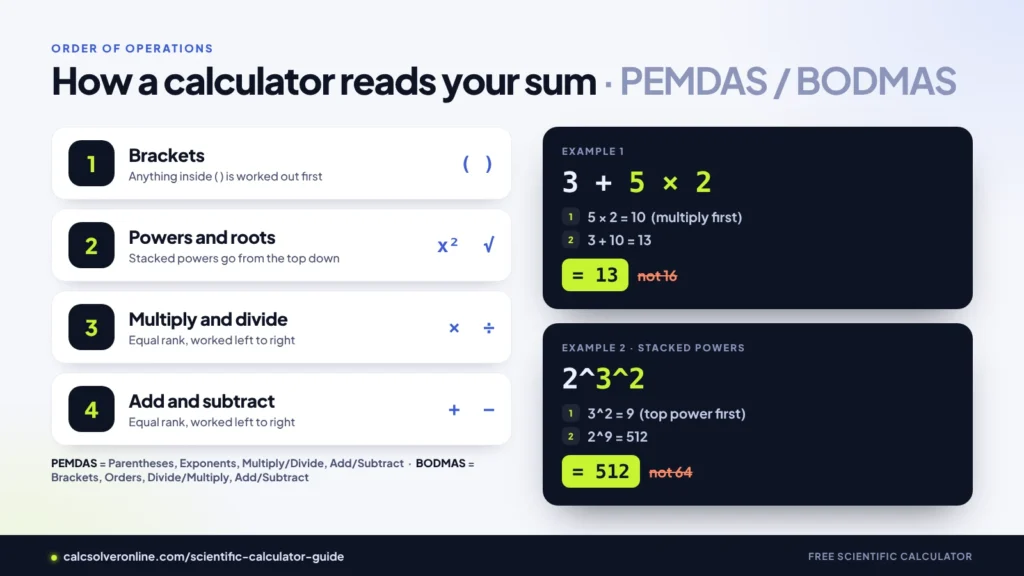
A scientific calculator follows the order of operations, often remembered as PEMDAS or BODMAS:
- Brackets first
- Powers and roots
- Multiplication and division, working left to right
- Addition and subtraction, working left to right
So 3 + 5 × 2 is 13, not 16. The 5 × 2 happens before the + 3.
Powers stacked on top of each other are the one exception to “left to right”. They’re worked out from the top down, so 2^3^2 means 2^(3^2) = 2^9 = 512, not 8^2 = 64. If you mean the other one, add brackets: (2^3)^2.
Brackets: The Habit That Fixes Most Errors
On paper, a fraction bar groups things for you. On a calculator, it doesn’t, so you have to add the brackets yourself.
Take the quadratic formula for 2x² + 3x − 5 = 0, where you want (−3 + √(3² − 4 × 2 × (−5))) ÷ (2 × 2).
- Typed with brackets around the top and the bottom: 1 (correct)
- Typed as −3 + √(3² − 4 × 2 × (−5)) ÷ 2 × 2, without them: 4 (wrong)
In the second version the calculator divides only the square root by 2, then multiplies by 2 again.
The same thing happens with π in the bottom of a fraction:
- 1 ÷ 2π = 1.5708, because it’s read as (1 ÷ 2) × π
- 1 ÷ (2π) = 0.1592, which is what most people mean
A simple rule: whenever a fraction bar has more than one number on the top or bottom, put brackets around each.
The Minus Sign Trap
Powers come before the minus sign, which surprises a lot of people.
- −3² = −9 (the 3 is squared, then made negative)
- (−3)² = 9 (the whole −3 is squared)
If a negative number needs to be squared, cubed or raised to any power, wrap it in brackets. The same goes for substituting a negative value into a formula: in the quadratic example above, c = −5 went in as (−5).
A negative power is fine without brackets around the exponent: 2^−3 = 0.125, which is 1/8.
Why 6 ÷ 2(1 + 2) Gives 9
This one goes viral every few months. CalcSolver gives 9: it works out the bracket (3), then reads left to right, 6 ÷ 2 = 3, then 3 × 3 = 9.
Some handheld calculators give 1 instead. They treat a number written right next to a bracket, like 2(1 + 2), as one tightly joined block and multiply it first. Neither machine is broken; they follow different conventions for that shortcut.
The fix is to never leave it to chance. Write 6 ÷ (2(1 + 2)) if you mean 1, or (6 ÷ 2)(1 + 2) if you mean 9. In a written exam, show the brackets in your working too.
Trigonometry, Start to Finish
Finding a side
A ladder 18 m long leans against a wall at 42° to the ground. How far is its foot from the wall?
The distance is the adjacent side, so use cosine: adjacent = hypotenuse × cos(angle). In degree mode, type 18cos(42) → 13.38 m.
Finding an angle
A ramp rises 5 m over a sloping length of 13 m. What angle does it make with the ground?
You know the opposite side and the hypotenuse, so use inverse sine: angle = sin⁻¹(5 ÷ 13). Type sin⁻¹(5 ÷ 13) → 22.62°.
Inverse trig keys (sin⁻¹, cos⁻¹, tan⁻¹) give an angle back. They answer the question “which angle has this ratio?”, not “1 divided by sin”.
Switching between degrees and radians
- Degrees to radians: multiply by π, divide by 180. 45° →
45 × π ÷ 180= 0.7854 - Radians to degrees: multiply by 180, divide by π. 1 rad →
1 × 180 ÷ π= 57.30°
log, ln and e
log is a base-10 logarithm. It asks “10 to what power gives this number?” So log(1000) = 3, and log(2) = 0.30103.
ln is the natural logarithm, base e (e ≈ 2.71828). ln(2) = 0.69315, and ln(e²) = 2.
Most calculators have no key for other bases, but one division handles any of them: log base b of x = log(x) ÷ log(b). For log base 2 of 8, type log(8) ÷ log(2) → 3. Use brackets around each log.
The eˣ key shows up in growth problems. Ordinary compound growth uses a plain power instead: 1,000 at 5% a year for 10 years is 1000(1 + 0.05)^10 = 1,628.89.
Reading Very Big and Very Small Answers
When a number is too long for the screen, the calculator switches to scientific notation, shown with an e (or E on many handhelds).
- 2^60 shows as 1.1529215e18, meaning 1.1529215 × 10¹⁸, a 19-digit number
- 1 ÷ 10^10 shows as 1e-10, meaning 0.0000000001
The number after the e tells you how many places to move the decimal point: right for positive, left for negative.
The screen also rounds what it shows, but the calculator keeps the full value behind it. That’s why 1 ÷ 7 × 7 comes back as exactly 1. Keep using Ans or chaining your sums rather than retyping a rounded answer, and round only once, at the very end.
Check Your Answer in Ten Seconds
Estimate first. For 48 × 19.7, think 50 × 20 = 1,000. If the calculator says 9,456, you know a key slipped. (The real answer is 945.6.)
Know a few values by heart. If these don’t come out right, your mode or typing is off:
| Type | You should see |
|---|---|
| sin(30) | 0.5 (in DEG) |
| cos(60) | 0.5 (in DEG) |
| tan(45) | 1 (in DEG) |
| sin(90) | 1 (in DEG) |
| sin(π ÷ 6) | 0.5 (in RAD) |
| log(10) | 1 |
| ln(e) | 1 |
| √(2)^2 | 2 |
Check the range. sin and cos always land between −1 and 1. A probability can’t be above 1. A length can’t be negative.
Something Looks Wrong?
| What you see | Likely cause | Fix |
|---|---|---|
| sin(30) gives −0.988 | Radian mode | Switch to DEG |
| A big negative where you expected positive | Minus sign outside the power | Use (−3)² instead of −3² |
| Answer far too big or small for a fraction | Missing brackets around the top or bottom | Bracket each part of the fraction |
| tan(90) shows Error | tan 90° is undefined | Check the question; the angle can’t be exactly 90° |
| √ of a number shows Error | The number inside is negative | Recheck signs inside the root |
| A long number with “e” in it | Scientific notation | Read e18 as × 10¹⁸ |
| Answer is close but not exact | You retyped a rounded value | Use Ans or the full value |
| sin⁻¹ shows Error | The ratio is above 1 or below −1 | A side or division is the wrong way round |
Can I Use an Online Calculator in an Exam?
Usually not. Most exams allow only approved handheld models, and phones and browsers aren’t permitted. Check with your teacher or exam board. An online calculator is best for homework, revision and checking your working, and everything in this guide works the same way on most handheld scientific calculators, apart from where the keys sit.